
Wave Accounting
Understand the supported connection and accounting steps.
Explore wave accountingWORKFLOW
Create quotes and invoices around the job record, with service lines, saved tax treatment, payment options and connected accounting workflows.
Android on Google Play. iPhone and iPad access through TestFlight.
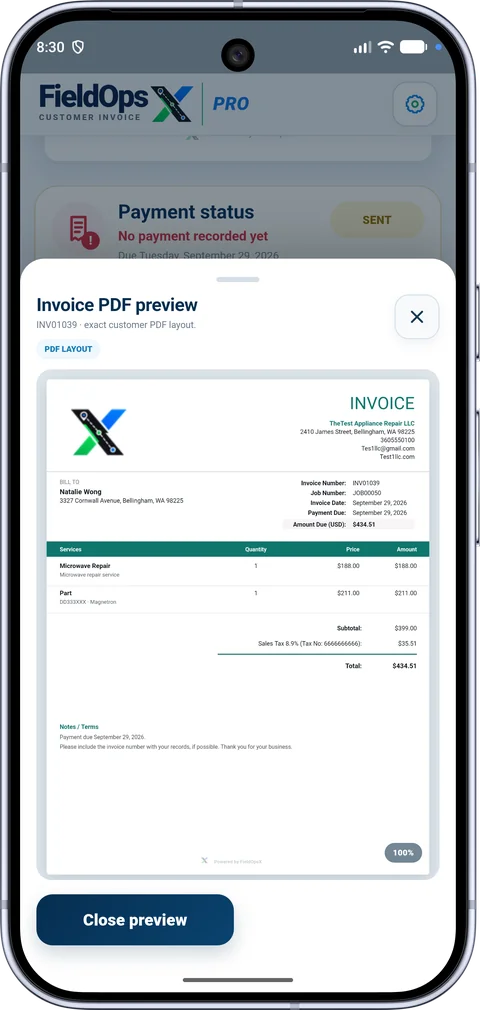
Use the job and customer details instead of typing the same information into unrelated tools. Review service lines, totals, taxes and the billing contact before sending.
A quote decision, invoice delivery, recorded payment and accounting sync each have their own status. Keep those steps visible, and use Pending Documents when the job is finished but the document still needs to be created.
Explore the integration and pricing details before choosing your setup.
Understand the supported connection and accounting steps.
Explore wave accountingSee company setup and supported workflows.
Explore quickbooks onlineReview the published plans, trial and referral program.
Explore pricingFor a repair visit, review the customer and billing contact, describe the work, then add the service and any parts you are charging for. Check each line’s tax setting and the document total before sending. A saved job expense records your cost; review the invoice separately to decide what the customer is being charged.
Preview the invoice before sharing it by email or text. If you offer card payments, connect Square and select the payment option for that invoice. You can also record a payment received another way, such as an e-transfer. The payment record and the accounting sync status let you check what has been recorded and what still needs attention.
Use the invoice list to review sent, overdue and paid documents. Open the invoice to check its amount due and payment history before following up. Keep that follow-up attached to the right customer and job, rather than starting a second invoice for the same visit.
PROFESSIONALLY BUILT FOR OWNER-OPERATORS
Choose the workflow that fits your business, then try it with your own working day.