
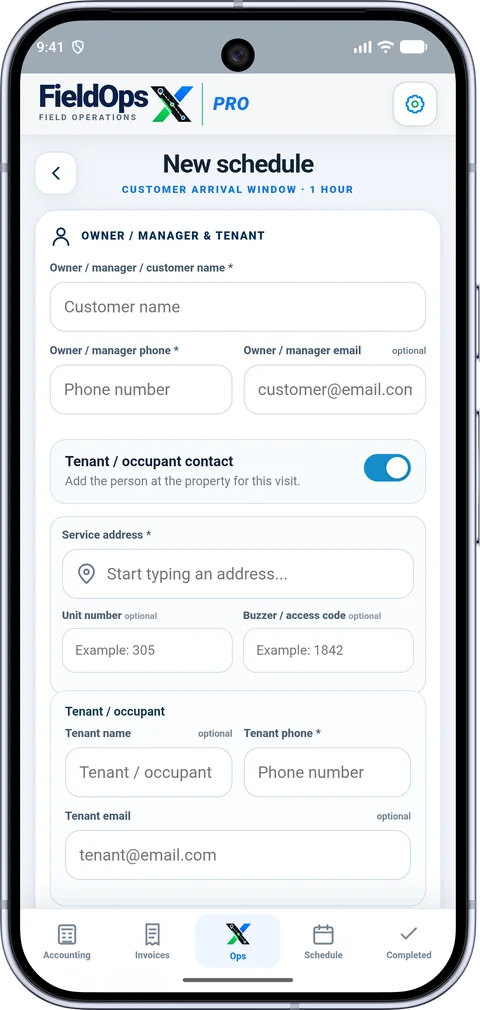
Customer and property context
Keep the billing contact and service address connected without treating every property as the same visit.
Explore customer and property contextHANDYMAN BUSINESSES
FieldOpsX Pro helps independent handyman businesses organize schedules, customer and property details, quotes, job expenses and invoices.
Android on Google Play. iPhone and iPad access through TestFlight.
Keep the address, scope of work and visit progress with the job so a small business does not need a separate system for every step.
Keep the billing contact and service address connected without treating every property as the same visit.
Explore customer and property contextRecord the purchase against the job and keep the receipt available for the accounting workflow.
Explore materials and expensesKeep document information with the work, including supported additional service lines and their saved tax treatment.
Explore quotes and invoicesPart-dependent jobs, quotes awaiting a decision and appointments needing scheduling can stay visible in the pending workflow. Review what is still open before planning the next day.
A handyman business may return to the same customer for several different tasks. Save the service address and a clear description for each job, then keep its quote, purchases and invoice connected to that visit. Check the billing contact when the person arranging access is different from the person paying.
Record a job-linked expense when buying supplies and attach the receipt photo or PDF. Keep the supplier amount and taxes accurate. Decide what to bill the customer in the invoice lines; the original purchase and the customer’s charge do not have to be the same amount.
Review completed work, prepare the customer’s document and check the payment status. If paperwork is still outstanding after completion, use Pending Documents to find work that needs attention. For a return visit, open the customer’s history before booking the next job.
PROFESSIONALLY BUILT FOR OWNER-OPERATORS
Choose the workflow that fits your business, then try it with your own working day.