SQUARE PAYMENTS
Keep payment options with the invoice.
Use the supported Square payment setup in FieldOpsX Pro to offer card-payment options alongside your invoice workflow.
Android on Google Play. iPhone and iPad access through TestFlight.
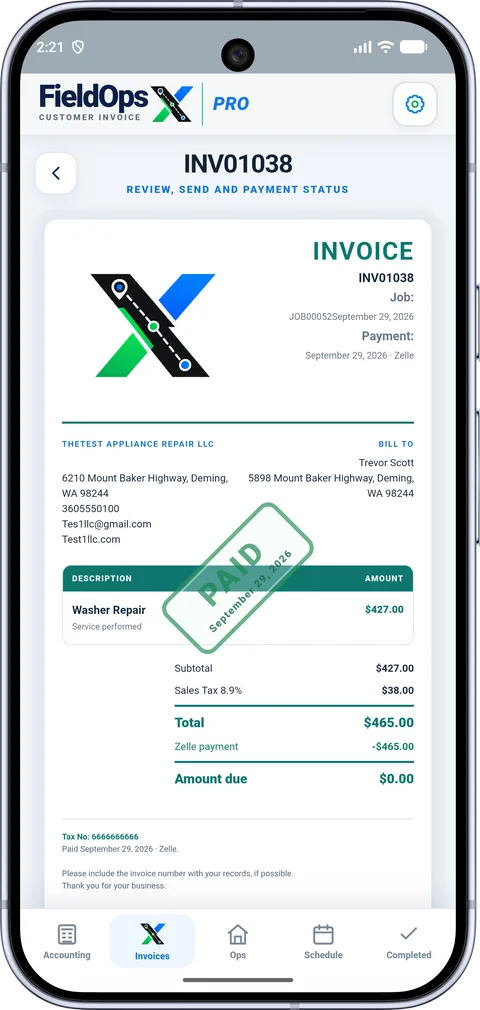
A clear path from invoice to payment.
Configure Square in Payment options, select the methods you want to offer, and review the payment status on the invoice. A recorded payment and a provider-confirmed payment are distinct states.
Know which business is connected.
Choose the correct Square account and location. Use the appropriate live or test environment, and verify the payment destination before offering a customer a payment link.
Questions before you start
Are card-processing fees included?
Square’s processing fees and account terms are separate from a FieldOpsX subscription. Check the current provider fees and any displayed invoice fee before sending.
Can I also record other payment methods?
FieldOpsX supports recording configured payment methods in the invoice workflow. Availability depends on your business setup and provider connections.
Offer a card-payment option with the invoice.
Connect your Square account in the payment settings, then review the payment options for the customer’s invoice. Check the customer, amount and invoice before sharing its payment link. Square handles the payment flow; a customer opening the link is not the same as a confirmed payment.
Check the payment against the right job.
Return to the invoice to review the payment status and any remaining amount due. Before recording a payment manually, check whether the Square payment has already been received and matched. Keep the original invoice and payment together instead of creating another document for the same work.
What does the integration include?
Square is a separate payment provider with its own account requirements and processing charges. FieldOpsX subscription pricing does not include those provider charges. Review the Square account you connected and its payment records when reconciling a card payment with a deposit.
PROFESSIONALLY BUILT FOR OWNER-OPERATORS
Keep the work moving.
Choose the workflow that fits your business, then try it with your own working day.