Offline-ready
Work anywhere without internet
Professionally built for owner-operators
FieldOpsX Pro is field service software for solo appliance repair technicians, handyman businesses and independent service professionals. Schedule jobs, keep customer history, manage parts, send quotes and invoices, and keep accounting connected.


Work anywhere without internet
Start trips with Google Maps and keep the ETA ready
Send documents, track payments and record costs
Google Drive on Android. iCloud on iPhone.
Sync invoices, expenses, payments and customer records without re-entering the job details
Apple, Google + Samsung Calendar. Jobs, changes and cancellations stay in sync.
FIELDOPSX XLINK
XLink is FieldOpsX Pro’s device connectivity technology. Connect your mobile devices and browser workspace to the same FieldOpsX business, and work wherever it makes sense.
Review your OPS, schedule jobs, manage customers, quotes, invoices, parts, expenses, accounting and backups from your phone, tablet or computer.
Android · iPhone · iPad · Tablet · PC · Mac · Web
Use FieldOpsX across Android phones and tablets, iPhone and iPad, and your web browser on PC or Mac.
Link multiple devices to the same FieldOpsX business without paying extra for each device.
Your linked devices work with the same business records, workflow and FieldOpsX workspace.
THE FIELDOPSX WORKFLOW
FieldOpsX is a field service management app and CRM that keeps the customer, job, parts, quote, invoice, payment and accounting record connected in one continuous workflow.
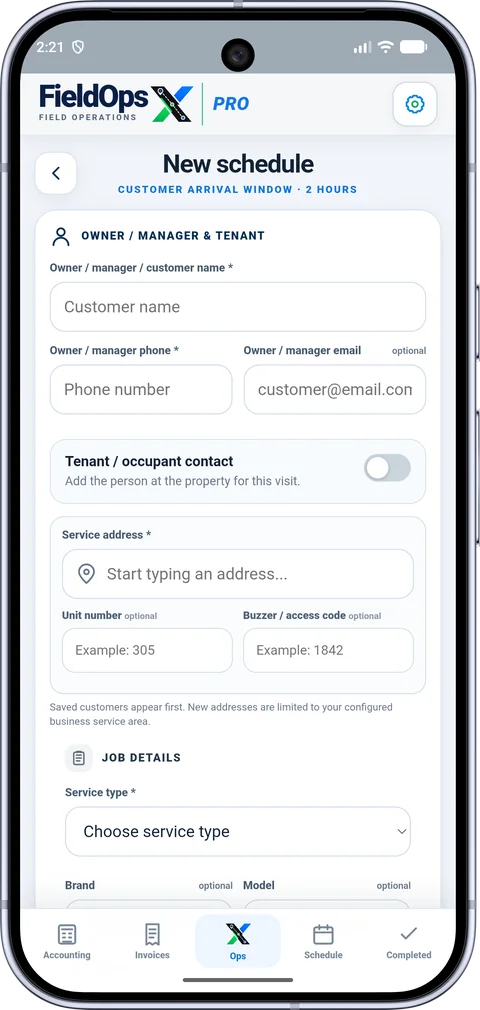
SCHEDULE & BOOKING
Create the visit with all the details you need in one place, including customer and tenant contacts, service address, unit or buzzer code, service type, time slot and arrival window.
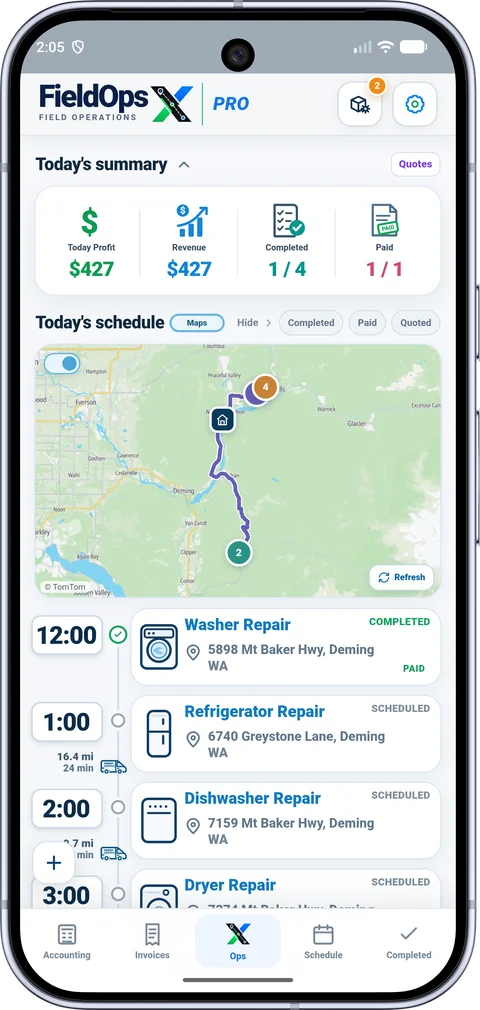
DAILY OPERATIONS
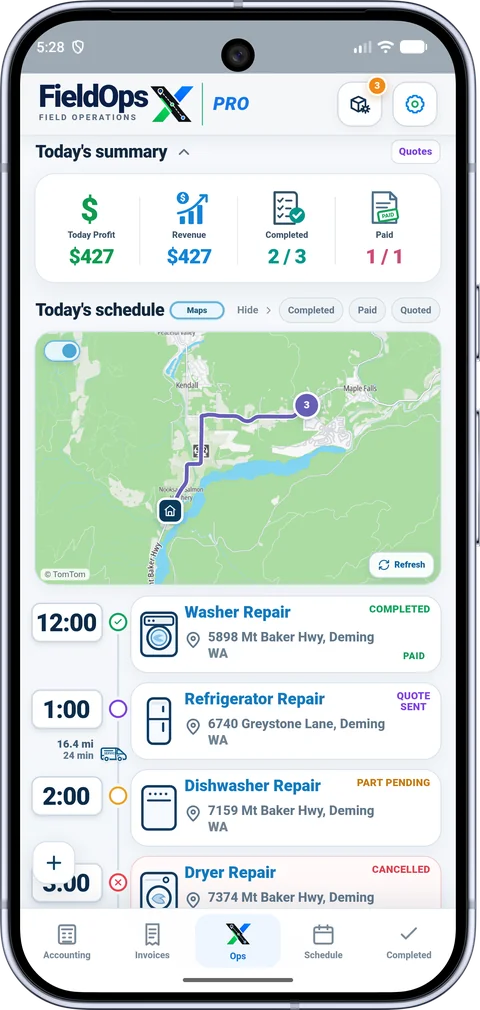
See today’s jobs, route and stop order in one screen. Collapse the summary or map when you need more space, hide completed work, and keep Inventory one tap away with part alerts visible from the icon.
ACTIVE JOB
Keep the route, trip status and field controls on one screen. Call the customer in one tap, send an OMW text with the current ETA automatically inserted, add parts or photos quickly, and complete the visit without leaving the job.
VISIT OUTCOME
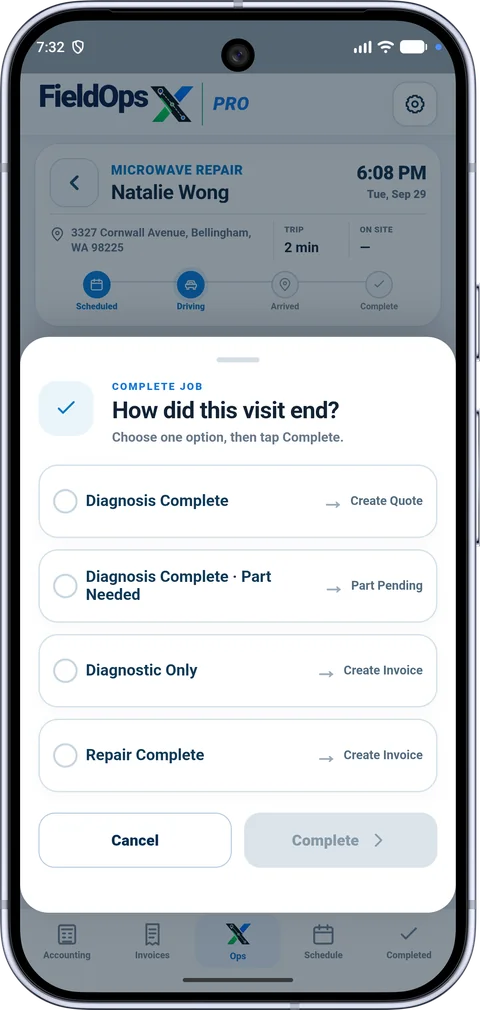
Complete the visit based on what actually happened. FieldOpsX opens the next workflow for you, quote, part pending or invoice, so you do not have to rebuild the job.
QUOTES
Create the quote from the same job, add parts, review tax and totals, then generate the PDF and prepare the customer email in one action. FieldOpsX fills the recipient, subject and message and attaches the quote automatically.
PARTS & INVENTORY
Track stock, low and out-of-stock parts, cost value and selling price from one inventory. Parts needed for customer jobs stay connected to that job, with a clear To Order list so nothing gets lost between diagnosis and the return visit.
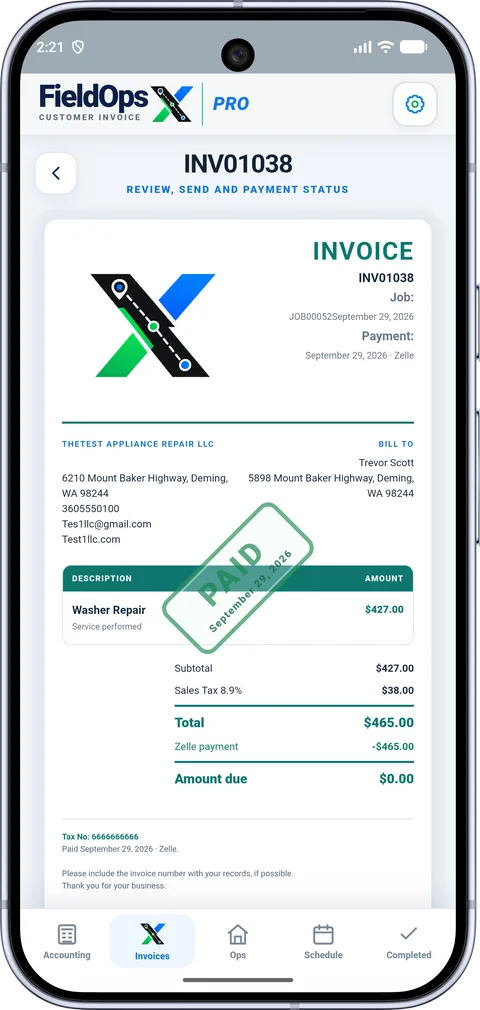
INVOICE + PAY
Create a professional PDF invoice and prepare the customer email in one action. FieldOpsX fills the message, attaches the invoice automatically, includes your configured payment methods, and keeps payment activity connected to the job and accounting sync.
Fully customizable invoices. Branding, details, payment methods and invoice content stay under your control.
ACCOUNTING
Connect QuickBooks Online or Wave and keep accounting tied to the same FieldOpsX workflow. Invoices, expenses, customers and products or services can sync without re-entering the job details.
One connected record from field work to accounting.
 QUICKBOOKS ONLINE
 WAVE
WAVEBUILT AROUND YOUR BUSINESS
FieldOpsX is built to adapt to the way you work. Configure your business, service area, working hours, scheduling rules, communication templates and app preferences, then keep everything protected with automatic backups.
Your branding, workflow, messages and business settings stay under your control.
Customize your business details, logo, services, invoice setup, scheduling rules and customer arrival windows.
Edit appointment, On My Way, invoice and payment reminder templates so customer communication sounds like your business.
Use FieldOpsX for appliance repair, HVAC, plumbing, electrical, handyman work and other field-service trades.
Keep independent backups on your device and in the cloud: Google Drive on Android or iCloud Drive on iPhone. Include photos and PDF receipts, and restore a full FieldOpsX backup when needed.
On iPhone, open Backup settings and choose Browse → iCloud Drive in Files. Select or create a FieldOpsX-Backup folder and tap Open. FieldOpsX remembers the folder for future backups.
Configure maps, location, notifications and other app preferences from one Settings area.
INCLUDED IN YOUR WORKING DAY
Automatic reminders for eligible paid, completed jobs. Prepare your own personalized SMS or email and send it from your messaging app.
See review requestsRecord a job expense, attach a photo or PDF and follow its supported Wave or QuickBooks accounting workflow.
See expense receiptsCompare FieldOpsX Pro with Jobber and Housecall Pro across pricing, review requests, parts stock and accounting.
Compare the three appsGo straight to the tools and setup information that matter to your business.
Plan service calls, track parts, and keep repair history with the job.
Explore appliance repair See parts inventory →Keep property visits, quotes and job expenses together.
Explore handyman businessesConnect the field job with your Wave accounting workflow.
Explore wave accountingConnect your company and bring accounting into the workflow.
Explore quickbooks onlineKeep working on the phone when connectivity is limited.
Explore offline field workRead how qualifying referrals earn annual-plan credit.
Explore referral rewardsFieldOpsX Pro is field service software for owner-operators, solo appliance repair technicians and handyman businesses. It connects scheduling, customer and service history, parts inventory, quotes, invoices and job expenses. About FieldOpsX Pro.
Yes. FieldOpsX Pro connects with Wave Accounting and QuickBooks Online for supported accounting workflows. Square provides customer card-payment options. Provider accounts and service requirements apply separately.
Yes. Keep part details, stock quantities, minimum levels, purchase cost and selling price. Use low-stock ordering and job-part receiving as part of the repair workflow.
USD $30/month or $300/year; CAD $40/month or $400/year, before applicable taxes. Annual billing saves 16.7% compared with 12 monthly payments. See the 30-day trial and plans.
PRICING
Try FieldOpsX with no charge during the trial.
$30USD / month
$300USD / year
Save $60 a year
Canadian pricing: $40 CAD/month or $400 CAD/year. Applicable taxes extra.
No setup fee. Cancel anytime. No refunds on paid subscription periods except where required by law.
DOWNLOAD FIELDOPSX
Available now on Google Play. Download and start your 30-day free trial.
For iPhone and iPad, join through TestFlight.
SUPPORT
Use the support page for app questions, downloads, privacy requests and account help.
Same FieldOpsX navigation and visual system across the site.