Wave Accounting
Understand the supported connection and accounting steps.
Explore wave accountingWORKFLOW
Keep your appointments, open work and route workflow together in FieldOpsX Pro, built for solo technicians and owner-operators.
Android on Google Play. iPhone and iPad access through TestFlight.
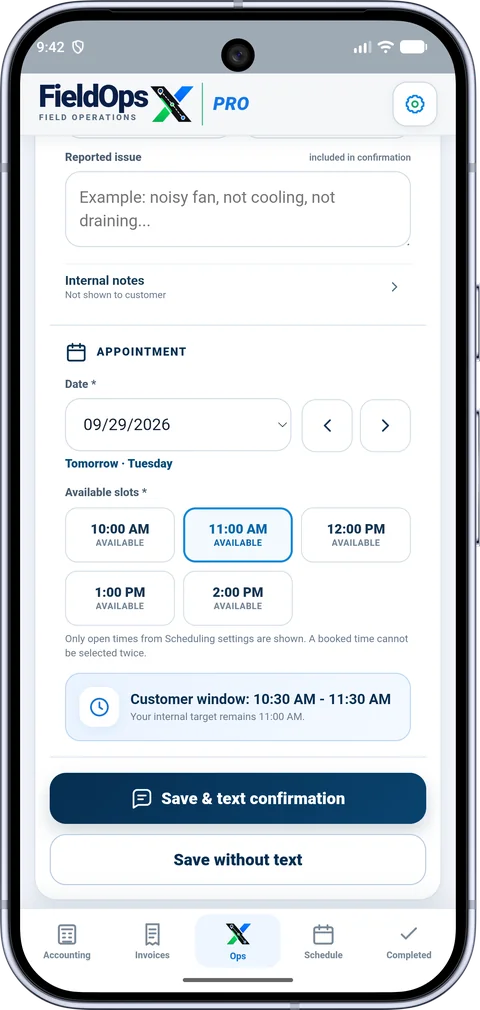
Use the schedule to review appointments, dates and customer addresses. The Pending view keeps carry-over and work awaiting scheduling within reach instead of hiding it in an old calendar day.
Open the job, review its details, and use supported map or navigation actions when leaving for the site. Route information and external navigation require the relevant device settings and connection.
Explore the integration and pricing details before choosing your setup.
Understand the supported connection and accounting steps.
Explore wave accountingSee company setup and supported workflows.
Explore quickbooks onlineReview the published plans, trial and referral program.
Explore pricingStart with the customer’s contact details and service address, choose the service type, then select an available date and time. Review the appointment before saving it. Use a description that helps you recognize the visit when checking the day’s schedule.
Today’s work and pending scheduling serve different purposes. Use the daily schedule for booked visits and the pending list for work that still needs a date or follow-up. When a customer changes the appointment, update the existing job so its customer history and documents stay together.
Review the job addresses alongside the day’s appointments to plan your travel. Check the destination before opening navigation, particularly when a customer has multiple properties. The schedule is designed for the owner-operator managing their own day; this page does not describe a multi-technician dispatch service.
PROFESSIONALLY BUILT FOR OWNER-OPERATORS
Choose the workflow that fits your business, then try it with your own working day.